
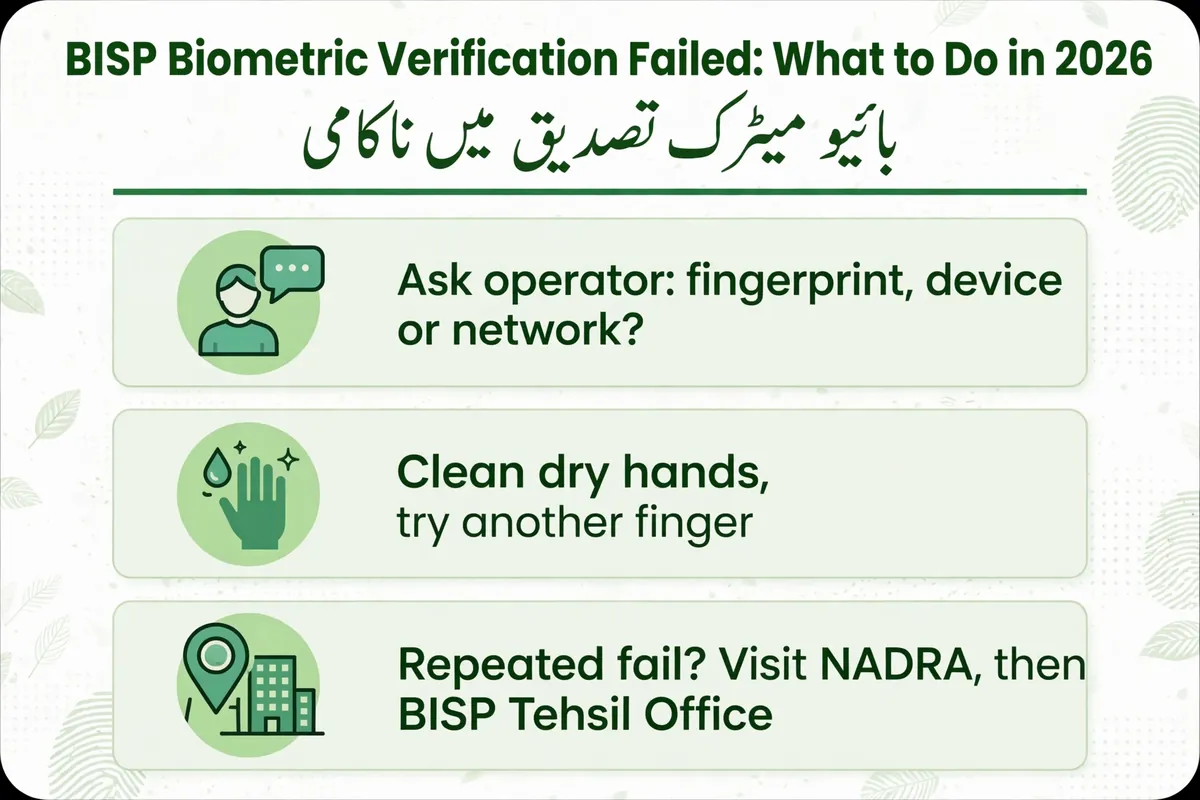
BISP Biometric Verification Failed: What to Do in 2026
BISP Biometric Verification Failed 2026 – Fingerprint Problems, NADRA Facial Verification and Payment Help
You visit a BISP payment centre, present your CNIC and place your thumb on a fingerprint scanner. The operator tries to verify your identity, but the machine rejects your fingerprint.
If this happens, it can be difficult to know whether the problem is with your identity record, the scanner or the payment system.
A BISP biometric verification failed message does not automatically mean your household has lost eligibility for financial assistance. Biometric authentication and a government eligibility decision are separate processes.
This guide explains the practical steps to take when fingerprint verification fails, how NADRA’s facial recognition certificate works, and where to report a payment problem.
Independent Website Notice: EhsaasProgram.org.pk is an independent informational website. We are not affiliated with BISP, NADRA or the Government of Pakistan. We do not verify fingerprints, collect CNIC numbers, process complaints or release payments.
Why Does BISP Biometric Verification Fail?
The Benazir Income Support Programme uses identity verification to help ensure that assistance reaches the correct beneficiary.
Fingerprint verification generally involves comparing the biometric information captured at an authorized payment point with government identity records.
A failed verification attempt can have several causes.
1. Fingerprints Are Difficult to Read
Fingerprints may be difficult for a scanner to capture because of age, injuries, skin conditions or repeated manual work.
Some people, including elderly beneficiaries and those who regularly perform manual labour, may experience persistent fingerprint-reading problems.
A scanning difficulty does not necessarily mean the person’s identity is invalid.
2. Scanner or Network Problems
The device may be experiencing a technical problem.
An interrupted connection, equipment issue or temporary verification-system problem can prevent a transaction from completing.
Ask the operator whether the system reported a fingerprint mismatch or a technical failure.
3. CNIC or Identity Information Needs Attention
An expired CNIC, incorrect identity information or another record-related issue may require assistance from NADRA.
However, a fingerprint mismatch does not automatically prove that a person’s identity record is incorrect.
The correct next step depends on the specific problem identified by the authorized operator.
What to Do Immediately If Your Thumb Verification Fails
If a payment-centre device rejects your fingerprint, follow these practical steps.
Step 1: Ask What Error Occurred
Request an explanation from the authorized operator.
Find out whether the issue concerns the fingerprint scan, identity verification, network connection or payment service.
Knowing the problem can help you avoid unnecessary visits to different offices.
Step 2: Follow the Approved Retry Procedure
If the operator confirms that another attempt is appropriate, follow the device’s official procedure.
Make sure your hands are clean and reasonably dry.
Do not repeatedly attempt verification beyond the limits allowed by the payment provider.
Step 3: Ask About Another Authorized Device
If the scanner appears to be faulty, ask whether verification is available at another authorized payment point.
Do not visit an unknown retailer or give your identity details to someone who claims to have a special device.
Step 4: Keep Relevant Records
If the operator provides a transaction slip, error reference or written instruction, keep it safely.
Record the payment location and date so you can explain the problem if you need to contact BISP.
Step 5: Contact BISP If the Problem Continues
If verification repeatedly fails, contact an authorized BISP Tehsil Office.
The staff can guide you toward the relevant identity-verification or payment-complaint procedure.
NADRA Facial Recognition for BISP Beneficiaries in 2026
An important development in 2026 is the introduction of facial recognition as an alternative identity-verification method for people whose fingerprints cannot be verified.
NADRA announced the issuance of facial recognition-based biometric verification certificates beginning January 20, 2026.
BISP subsequently issued specific guidance for women beneficiaries experiencing persistent thumb-verification problems.
Under the announced process, affected beneficiaries can seek verification through NADRA and then submit the resulting certificate to BISP.
This is an authorized verification option, not a method for bypassing government identity checks.
How to Obtain a NADRA Facial Verification Certificate
BISP’s March 2026 guidance described the following procedure.
Step 1: Visit NADRA With Your Original CNIC
Go to an authorized NADRA Registration Centre or a designated NADRA mobile registration van serving BISP beneficiaries.
Bring your original, valid CNIC.
If you have already experienced repeated verification failures, explain this to the staff.
Step 2: Request Assistance for Failed Fingerprint Verification
Tell the NADRA staff that your fingerprints cannot be successfully verified for BISP payment purposes.
NADRA will determine the appropriate identity-verification procedure.
Step 3: Complete Facial Recognition Verification
Where the applicable procedure is available, NADRA can use facial recognition to verify the person’s identity against its records.
This process involves a new facial photograph and the relevant identity checks.
Step 4: Obtain the Verification Certificate
Following successful verification, NADRA may issue a facial recognition-based biometric verification certificate.
The announced fee in January and March 2026 was Rs. 20.
NADRA’s published arrangements described a certificate containing identity details, a verification reference and a QR code.
The originally announced certificate validity was seven days, so beneficiaries should confirm current validity and instructions before obtaining one.
Step 5: Submit the Certificate to BISP
After receiving the certificate, visit the relevant BISP office and ask officials to register or verify it through the approved process.
The certificate does not itself release money.
BISP must still confirm the beneficiary’s record and the applicable payment procedure.
Step 6: Follow Official Payment Instructions
Wait for the relevant official confirmation or payment communication.
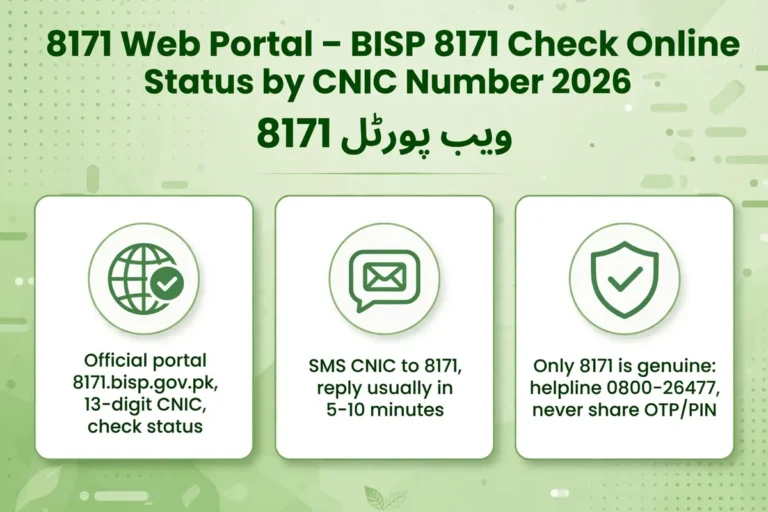
BISP uses 8171 as its official beneficiary SMS number.
Do not travel to collect an installment solely because you have obtained a facial verification certificate.
Important: The Rs. 20 amount is the announced NADRA certificate fee. It is not a fee for BISP registration or a charge for releasing financial assistance. Confirm the currently applicable fee directly with NADRA.
Can You Receive BISP Money Without Fingerprint Verification?
Some beneficiaries have genuine physical or medical difficulties that make ordinary fingerprint verification unreliable.
BISP and its financial partners have procedures for addressing such situations.
The State Bank of Pakistan’s 2025 instructions allow participating banks, under specified conditions, to use documented alternative identity checks such as NADRA Verisys when biometric verification cannot be performed for genuine reasons.
However, these banking arrangements have defined requirements and do not mean that every retailer can release money without biometric verification.
Similarly, the NADRA facial recognition certificate follows the process established by the relevant government institutions.
If you cannot complete the normal verification procedure, ask your BISP office which authorized alternative applies to your particular payment channel.
Never pay an agent who claims to provide an immediate biometric bypass.
How to Register a Biometric Complaint With BISP
If your fingerprints continue to fail and you cannot collect an authorized installment, a formal complaint may help identify the appropriate next step.
Step 1: Visit an Authorized BISP Office
Go to the relevant BISP Tehsil Office or use the official complaint channel.
Explain where the failed transaction occurred and what the payment operator told you.
Step 2: Provide the Relevant Information
BISP staff may ask for your original CNIC and details of the failed transaction.
If you have visited NADRA, mention whether an identity update or facial recognition certificate was issued.
Step 3: Ask for a Complaint Reference
Request a complaint reference or other acknowledgment if one is provided.
Keep it safely so you can follow up without repeatedly explaining the entire situation.
Step 4: Follow the Official Instructions
The response may depend on whether the problem is related to NADRA identity records, the payment provider, the biometric device or another administrative issue.
Do not assume that every complaint is resolved through the same procedure.
For official assistance, contact the BISP helpline at 0800-26477.
Documents to Carry When Seeking Help
The exact documents depend on your case, but preparing relevant records can prevent unnecessary visits.
| Document | Why It May Help |
|---|---|
| Original CNIC | Identity verification |
| Payment notification | Information about the relevant installment |
| Transaction or error slip | Details of the failed verification attempt |
| NADRA acknowledgment | Evidence of a completed identity service |
| Facial verification certificate | Supports an applicable alternative verification process |
| BISP complaint reference | Helps officials identify an earlier complaint |
Only share sensitive documents with authorized government or financial-service staff.
What If Your Payment Is Available but Your Fingerprints Fail?
A beneficiary may have received an official installment notification but still be unable to complete a transaction because of a biometric problem.
In this situation, distinguish the payment issue from the identity-verification issue.
First, confirm the payment information through an authorized BISP channel.
Then ask the relevant office about the verification procedure needed to complete the transaction.
Do not assume that your payment has disappeared simply because one scanner rejected your thumb.
Also, do not accept an unexplained claim that your payment has already been withdrawn. Request clarification through the appropriate official complaint channel.
For general installment information, read our BISP Payment Status Guide.
Common Biometric Problems and Next Steps
| Problem | Recommended Action |
|---|---|
| Fingerprint rejected once | Ask the operator about a technical issue or permitted retry |
| Repeated fingerprint mismatch | Seek NADRA and BISP guidance |
| Fingerprints cannot be captured reliably | Ask about facial recognition verification |
| CNIC details are incorrect | Contact NADRA for the appropriate correction |
| Payment remains inaccessible | Register a complaint with BISP |
| Agent demands money to bypass verification | Refuse and report the demand |
These are general recommendations. The authorized institution must determine which procedure applies to an individual beneficiary.
How to Avoid Biometric Payment Scams
Beneficiaries experiencing payment difficulties may be especially vulnerable to fraudulent claims.
Someone may promise to unlock a blocked account, change fingerprints or obtain money immediately in exchange for a fee.
Such promises should not be trusted.
Protect yourself by following these precautions:
- Use authorized NADRA and BISP facilities.
- Keep your original CNIC secure.
- Never share your banking PIN, OTP or password.
- Do not pay unknown agents for biometric verification shortcuts.
- Follow official communications from 8171.
- Report suspected fraud through official complaint channels.
Remember that a legitimate NADRA identity-service fee is different from an unauthorized payment demanded by a private agent.
Frequently Asked Questions
What should I do if my BISP thumb verification fails?
Ask the authorized payment operator whether the problem is with the scanner, fingerprint or identity information. If verification repeatedly fails, seek guidance from NADRA and your BISP Tehsil Office.
Can elderly beneficiaries use facial recognition?
NADRA introduced facial verification to assist citizens whose fingerprints cannot be reliably verified, including some elderly people. BISP can advise whether the process applies to an individual beneficiary.
What is the NADRA facial verification certificate fee?
The announced fee in 2026 was Rs. 20. Confirm the current amount and certificate validity directly with NADRA.
Does failed biometric verification cancel BISP eligibility?
Not automatically. Identity verification and programme eligibility are separate processes. BISP must confirm the person’s individual status.
Can a relative collect the installment instead?
Do not assume another person can collect a beneficiary’s payment. Ask BISP about the authorized procedure for cases involving serious identity-verification difficulties.
How long does biometric complaint resolution take?
There is no single verified resolution period for every case. Keep the complaint reference and follow up through official BISP support.
Official Sources and Assistance
For accurate information, consult:
Benazir Income Support Programme — Beneficiary information and complaint guidance.
NADRA Official Website — Identity verification and registration services.
BISP Facial Recognition Guidance – March 2026 — Official explanation of the facial verification procedure for women beneficiaries.
NADRA Facial Recognition Announcement — Certificate issuance and announced fee.
State Bank of Pakistan – BISP Banking Instructions — Alternative verification provisions in applicable bank arrangements.
BISP Helpline: 0800-26477
Information reviewed: November 13, 2026. Identity-verification requirements, certificate charges and payment procedures may change. Confirm current instructions with NADRA and BISP.
Disclaimer: EhsaasProgram.org.pk is an independent information website. It is not affiliated with BISP, NADRA or the Government of Pakistan. We cannot verify biometric identity, alter beneficiary records, register complaints on a visitor’s behalf or authorize payments.
2 Comments